Budget PSUs in 2026: Where a £70 Saving Turns Into a £700 Repair Bill
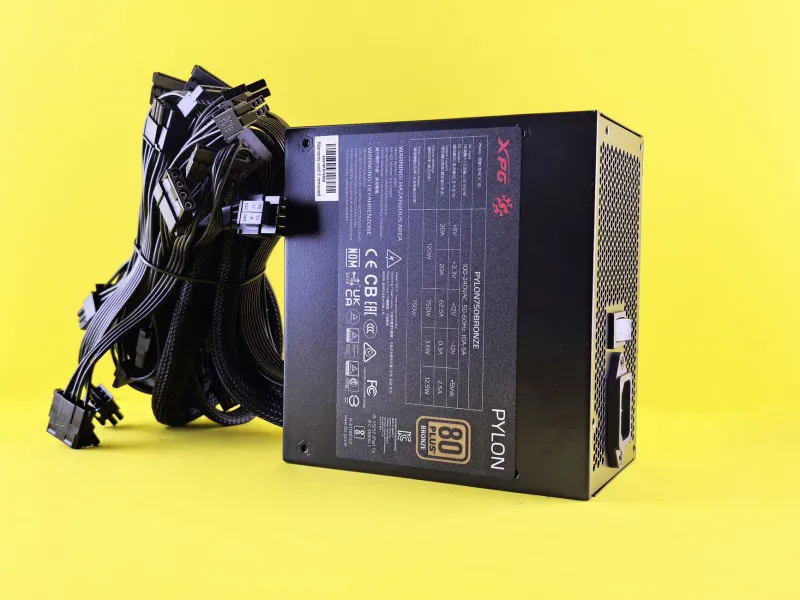
The power supply is the easiest part to dismiss when you are adding up a build. It does not render frames, it does not show up in benchmarks, and it usually sits behind a metal shroud. That is exactly why budget PSUs remain the riskiest corner of a UK build in 2026. A £70 unit can look like a sensible saving next to a £110 one, right up to the point where it trips, buzzes, cooks a drive, or takes the motherboard with it.
This is not about telling everyone to buy a 1000W Titanium monster. It is about knowing where the floor is. In the £60–£80 bracket you can buy something perfectly sensible for a modest gaming PC or office build. You can also buy a decorative metal box with optimistic stickers on it. The difference is in the details, and most of those details are on the box or the retailer listing if you know where to look.
Why the power supply is the one part you cannot cheap out on
Every other component has a job you can see. The CPU is fast or slow. The GPU is smooth or stuttery. The SSD loads a game before you have finished your tea. The PSU is different: it converts mains power, holds voltages steady, and protects everything downstream when something goes wrong. When it fails badly, it does not just stop working. It can send a spike through the 12V rail, damage storage, or cause intermittent faults that take hours to diagnose.
UK mains is nominally 230V, and your domestic ring main is not a laboratory supply. It dips, spikes, and carries noise from fridges, microwaves and cheap chargers. A decent PSU filters that and keeps going. A poor one may shut down under transient loads, produce coil whine, or run its capacitors closer to the edge than the label admits. That is before we get to the connector side of things.
What 80 Plus does and does not tell you
80 Plus is an efficiency badge. It tells you roughly how much mains power is wasted as heat at a few load points. It does not tell you whether the unit can deliver its rated wattage continuously at 40°C, whether the protection circuits work, or whether the capacitors are from a reputable supplier. A Bronze-rated unit from a brand with proper UK support can be a better buy than a Gold-rated no-name unit with a melted PCIe connector and a warranty address in another time zone.
That said, 80 Plus is still useful as a minimum quality signal. For a budget build in 2026, Bronze is a reasonable floor. Gold is worth paying for if the price gap is small or if the PC will run for long hours. White-rated units are not automatically bad, but they are usually built to a price, and the savings are rarely big enough to justify the risk.
ATX 3.1 and transient loads: the 2026 issue
Modern graphics cards are not polite. They do not draw a steady 250W; they spike well above their rated board power for milliseconds. Older PSU designs can trip on those transient loads even when the average wattage looks fine. ATX 3.1 is the current spec, and it includes requirements for handling short power excursions. It also brings the 12V-2x6 connector, which is the revised version of the 12VHPWR connector that caused so much discussion in previous years.
If you are buying a new PSU for a GPU with a 12V-2x6 connector, look for ATX 3.1 and a native cable rather than a bundle of adapters. Adapters are not automatically dangerous, but they add resistance and another point of failure. For a lower-power card using standard 8-pin connectors, ATX 3.1 is still a useful marker of a modern design, but it is not essential. What matters more is honest continuous wattage and good transient response.
Connectors, cables and the UK plug reality
A budget PSU often saves money by giving you fewer cables, shorter cables, or cables that are not quite what the picture promised. Check the listing carefully. If you need two separate 8-pin PCIe cables for a GPU, do not accept a single cable with two daisy-chained plugs if the card maker recommends otherwise. If you are building in a small case, check the length of the 24-pin and EPS cables. A cheap unit with a short EPS cable can make a neat build impossible.
The UK plug side matters too. A reputable unit will ship with a properly fused UK plug or a UK-specific power cord. Avoid anything that arrives with a European plug and a loose adapter. That is not just inconvenient; it is a sign that the unit was not packaged for this market. Check the warranty terms as well. A three-year warranty with UK returns is more useful than a five-year warranty that requires posting a heavy box to another country at your own cost.
What £60–£80 actually buys in the UK
At the time of writing, £60–£80 from UK retailers such as Scan, Ebuyer, CCL, Overclockers UK and Novatech can buy a competent 550W–750W Bronze or Gold unit from a known brand. You are usually looking at a 5-year warranty at the top of that range and a 3-year warranty at the bottom. You can also find 80 Plus White units with big wattage numbers and suspiciously light heatsinks. The wattage number is the least interesting part of the listing.
For a basic 1080p gaming build or a general-purpose desktop, a 650W Bronze unit from a brand with a proper UK RMA process is enough. For a build with a mid-range GPU that spikes hard, or a small office machine that runs all day, a 750W Gold unit with ATX 3.1 support is a more sensible long-term buy. The extra £20–£30 is not glamorous, but it is cheaper than replacing a motherboard and a storage drive.
A pre-purchase checklist that takes two minutes
- Check the continuous wattage at 40°C or higher, not just the peak wattage on the front of the box.
- Look for 80 Plus Bronze as a minimum, and Gold if the price gap is small.
- Confirm ATX 3.1 support if you are buying for a modern GPU with a 12V-2x6 connector.
- Check the number and type of PCIe connectors against your GPU maker's recommendation.
- Look for over-current, over-voltage and over-power protection in the spec sheet.
- Check the warranty length and whether returns are handled in the UK.
- Read at least one proper load test or teardown from a reviewer who measures ripple and transient response.
- Avoid units that only list peak wattage, have no UK plug, or come from a brand with no UK support presence.
When to spend more rather than chase the low price
Spend more if you are building a PC with a GPU that has high transient spikes, if the machine will run 24/7, if it holds business data, or if you plan to upgrade the GPU later. Spend more if the case is tight and you need a specific cable set, or if you value a 7–10 year warranty. A £95–£120 PSU is not overkill on a £700 build. It is insurance on the parts you cannot easily replace.
The £70 trap is not that every cheap PSU is dangerous. It is that the bottom of the market is unpredictable, and the savings are small compared with the downside. Buy from a UK retailer with a clear returns process, check the spec sheet rather than the marketing copy, and treat the PSU as a long-term component. It is the one part of your build that should outlast the upgrade cycle.