Before You Bin That Noisy Desktop, Try £40 of Fans and Filters
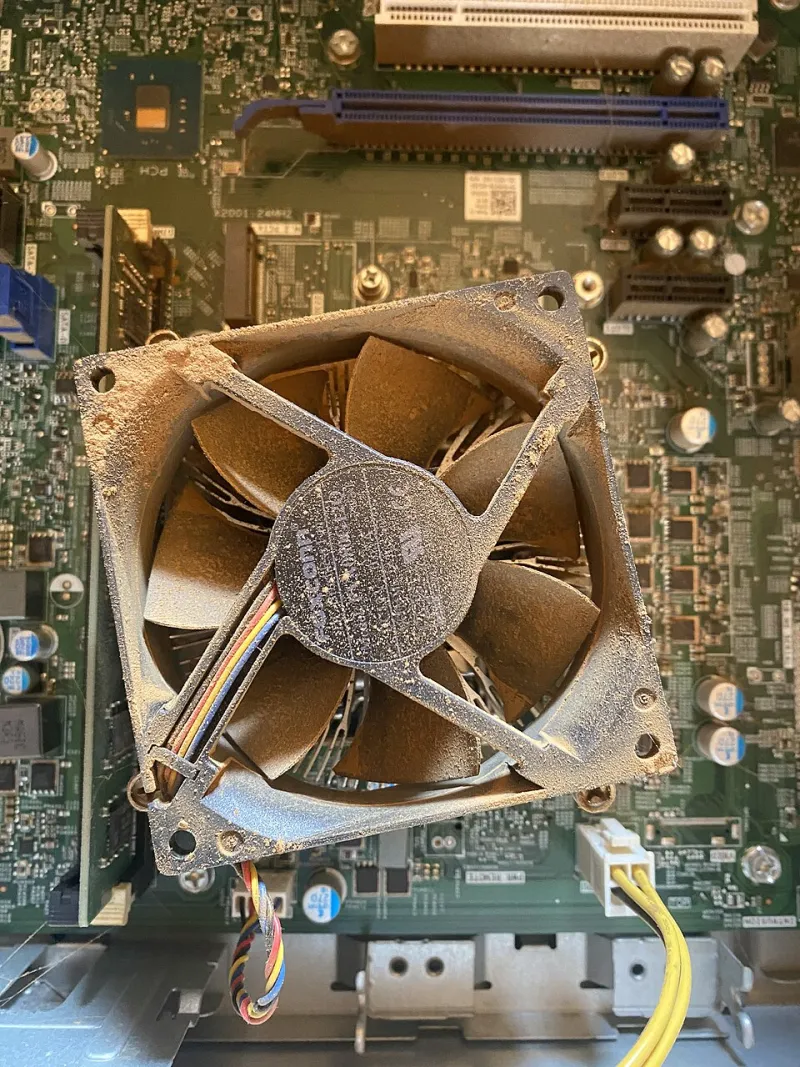
Photo: B722N, CC BY-SA 4.0, via Wikimedia Commons
The noise creeps up on you
The noise creeps up on you. First it is a faint drone under the desk. Then summer arrives, the side panel gets warm, and suddenly your PC sounds like a Ryanair departure from Stansted. The temptation is to open a retailer tab and start spec'ing a replacement. Before you do, spend an afternoon and about £40. Most noisy desktops are not tired; they are dusty, badly controlled, or saddled with the one fan the manufacturer bought by the pallet.
This is not a modding project. No custom loops, no RGB, no Dremel. It is a tune-up for a normal UK desktop — the family PC, the spare-room workhorse, the small-office box that sits under a desk and gets forgotten until it starts competing with the kettle.
Diagnose before you buy
Start with a phone decibel app. It will not be lab-accurate, but it is consistent enough for before-and-after. Put the phone 30cm from the front of the case, close the windows, turn off the telly and take a reading at idle. Then run something predictable — a game menu, a HandBrake encode, a big Excel recalculation — and note the load reading. Write both down. You will want them later.
Next, find the noise. With the PC off and unplugged, take off the side panel. Use a soft brush and a vacuum with a plastic nozzle — keep the vacuum a few centimetres away — to clear dust from the CPU heatsink, GPU fins, case filters and fan blades. Do not spin fans with compressed air; it can over-speed the bearing. Do not open the power supply. Ever.
If the noise remains after cleaning, isolate it. Power on with the case open, then briefly stop each fan with a finger or a pencil against the hub — not the blades. The one that makes the racket is your culprit. A grinding or ticking fan is usually a bearing on the way out; a whooshing fan is usually a curve problem.
The £40 shopping list
You do not need Noctua everything. A sensible UK basket looks like this:
- Two Arctic P12 PWM PST 120mm fans, around £8-10 each. They are not the quietest fans ever made, but they are good, widely stocked and cheap enough to replace without guilt. Check your case fits 120mm; many older cases also take 140mm, so measure first.
- A Thermalright Assassin X 120 R SE or similar budget tower cooler, around £18-20. This is the single biggest win on a stock Intel or AMD cooler that ramps up like a hairdryer. Check socket support and case height — most mid-towers are fine, but small-form-factor boxes are not.
- A generic dust filter kit or a sheet of fine mesh, around £8. If your case has no front filter, this stops the next round of dust. Clean it monthly.
That is roughly £36-48 depending on postage. Buy from Scan, Ebuyer, Overclockers UK or Amazon UK — whichever has stock and does not charge silly delivery. If you already have two good case fans, skip those and put the money towards a better cooler.
Fit the bits without drama
Replace the rear exhaust first. It is usually the hardest-working fan and the easiest to reach. Then the front intake. Point the airflow the same way as the old fans — front to back, bottom to top. Plug PWM fans into the motherboard's chassis headers; if you run out, use a splitter, not a Molex-to-three-pin lash-up from the depths of a cable bag.
For the cooler, remove the old one carefully. On AMD AM4/AM5, twist gently to break the paste seal before pulling. Clean the CPU with isopropyl alcohol and a lint-free cloth, apply a pea-sized blob of paste, and tighten the cooler in a cross pattern. Do not overtighten. If you have never fitted a cooler, watch a five-minute video for your socket first; it is not difficult, but it is easy to rush.
Set a fan curve that is not an afterburner
This is where most prebuilts and home builds go wrong. The default curve is often aggressive: 40°C triggers a jet engine, because the manufacturer would rather be cool than quiet.
In the BIOS, find the fan control screen. Set the case fans to a flat 40-50% until about 60°C, then ramp to 80% by 75°C. For the CPU fan, start around 30-35% at idle, 50% at 60°C, and 100% only above 85°C. If your BIOS is awkward, use Fan Control in Windows — it is free, reads most motherboards, and lets you set a curve without rebooting.
Check the GPU too. Many graphics cards have a zero-fan mode and a steep default curve. A mild undervolt or a gentler curve in MSI Afterburner can shave a few decibels, but do not chase huge overclocks on a quiet build. Quiet and fast rarely share the same curve.
The before-and-after test
Put the side panel back on. Wait ten minutes for temperatures to settle. Take the same phone reading at the same distance, in the same room, at idle and under the same load. A drop of 5-10dB is noticeable; 10dB is roughly a halving of perceived loudness. You will also notice the character of the noise: less grinding, more of a soft whoosh.
If it is still loud, you have not failed. Check for a hard drive resonating against the case, a loose side panel, or a pump in an all-in-one cooler. A £5 pack of rubber fan mounts can kill a surprising amount of hum.
The bottom line
A new PC is the right answer when the old one is slow, insecure or failing. It is usually the wrong answer when it is merely noisy. For £40 and an afternoon, most UK desktops can go from embarrassing to background. Clean it, replace the worst fans, fit a sensible cooler and stop the fan curve from panicking. Your ears — and anyone sitting near you in the office — will thank you.